The database architecture for LLM-first applications
Dreambase is not pgvector — the HNSW index was co-designed with the storage engine, not added as an extension. It is not a vector store with a SQL adapter bolted on. The query planner treats vector similarity and scalar predicates as equal-class citizens and optimizes across both in one plan.
Core concepts
Every row carries both representations
In Dreambase, a table column can be typed as vector(dims) alongside standard SQL column types. There is no separate index object — the vector column is part of the row schema.
This means a single INSERT writes both structured metadata and the vector representation atomically. A delete removes both. An update refreshes both in the same transaction.
- ACID guarantees cover vector columns as first-class citizens
- No dual-write, no tombstone sync, no eventual-consistency lag
- Schema migrations (ADD COLUMN, ALTER TYPE) work on vector cols
-- Define hybrid table
CREATE TABLE documents (
    id         UUID PRIMARY KEY DEFAULT gen_random_uuid(),
    user_id    TEXT NOT NULL,
    content    TEXT,
    category   TEXT,
    created_at TIMESTAMPTZ DEFAULT NOW(),
    embedding  VECTOR(1536)
);

-- HNSW index created automatically
-- No separate vector store needed
Cost-based hybrid query planner
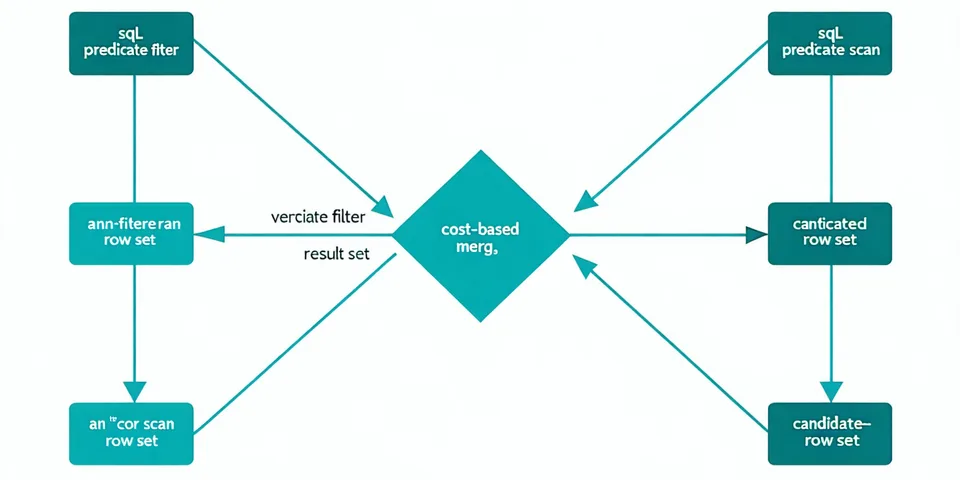
The query optimizer looks at both SQL predicate selectivity and vector index statistics to decide scan order. When a WHERE clause would eliminate 95% of rows, scalar filter runs first — you're doing ANN on a small candidate set, not the whole table.
When selectivity is low, the planner flips: ANN scan produces top-K candidates, then SQL predicates apply. The crossover point is learned from actual index statistics, not a hardcoded threshold.
- No query hints required — the planner makes the right call automatically
- EXPLAIN HYBRID shows estimated cost for both paths
- Supports JOINs, GROUP BY, window functions on hybrid tables
EXPLAIN HYBRID
SELECT id, content
FROM documents
WHERE user_id = 'u_441'
ORDER BY embedding NEAR $1
LIMIT 5;

-- Output:
-- Plan: scalar-first (selectivity 0.003)
--   Scalar filter: user_id = 'u_441' → 2,847 rows
--   ANN on 2,847-row candidate set
-- Est. cost: 4.2ms at current index size
Embeddings that are always current
The fundamental problem with dual-store architecture is temporal: your SQL database reflects the latest state of data, but your vector store reflects the last time you ran an embedding job. In production, that lag is typically 15 minutes to 48 hours.
In Dreambase, the embedding column is part of the row. When you UPDATE a row — whether from an API write, a migration, or a background job — the embedding is part of the same transaction. The HNSW index reflects the committed state of the table, always.
- No separate embedding pipeline to maintain or monitor
- No "stale embedding" class of production incidents
- Batch embedding updates work as normal SQL batch UPDATE
# Update content + embedding atomically
new_embedding = embed(new_content)
db.execute(
    "UPDATE documents SET content=%s,"
    " embedding=%s WHERE id=%s",
    [new_content, new_embedding, doc_id]
)
# Vector index reflects this commit.
# No lag. No sync job needed.
Python, Node, and PostgreSQL wire protocol
Dreambase speaks the PostgreSQL wire protocol. That means any Postgres-compatible client works out of the box — psycopg2, asyncpg, node-postgres, SQLAlchemy, Prisma. No special driver required for basic connectivity.
The native SDKs add convenience wrappers for vector column handling (automatic float32 array serialization, type-safe query builders, async support) and advanced features like EXPLAIN HYBRID parsing.
pip install dreambasenpm install dreambase- REST API for non-SDK environments
- Full async support (asyncio, async/await)
import asyncio
import dreambase

async def main():
    async with dreambase.AsyncClient(
        url="postgresql://..."
    ) as db:
        rows = await db.query(
            "SELECT * FROM docs"
            " ORDER BY emb NEAR $1 LIMIT 5",
            [query_vec]
        )
        return rows

asyncio.run(main())
Technical specifications
Hard numbers. The limits listed are enforced, not estimated. The latency figures are measured on Production-tier managed cloud at the stated row counts.
| Vector index type | HNSW (hierarchical navigable small world) |
| SQL dialect | PostgreSQL-compatible (wire protocol) |
| Max vector dimensions | 4096 |
| Supported embedding models | Any model producing float32 arrays |
| Query latency (p99) | < 50ms at 1M rows (hybrid) |
| Storage engine | Custom column store with vector co-location |
| Deployment | Cloud-hosted (managed) or self-hosted Docker |
Why not Pinecone + Postgres?
Each option has real trade-offs. If you need sub-millisecond ANN at 100M+ vectors with write throughput above 50K/s, Dreambase is not the right tool — a purpose-built vector store is. If you need fresh retrieval, SQL joins on the same data, and fewer moving parts to operate, read on.
| Capability | Pinecone + Postgres | pgvector | Dreambase |
|---|---|---|---|
| Sync complexity | High — custom sync job required | None — same DB, but triggers needed | Zero — atomic writes |
| Query freshness | Lag = embedding job interval | Fresh, but ANN quality limited | Always current |
| Hybrid SQL + vector query | Two separate queries + app-layer join | Possible, but planner unaware of vectors | Native, cost-optimized |
| Full SQL (joins, windows) | Yes (Postgres side) | Yes | Yes |
| Ops overhead | Two services, two monitoring stacks | Low — single Postgres instance | Low — single managed service |
| ANN index quality at scale | High (purpose-built) | Medium — HNSW added post-launch | High — HNSW co-designed with storage |